Everything in this article lives in Settings → Account in the app: changing your password, updating your profile, exporting your data, and deleting your account.
Change your password
If you signed in with email and password:
- Open Settings → Account → Change Password.
- Enter your current password, then your new password twice.
- You'll stay signed in on the current device. Other devices may be asked to re-authenticate.
If you forgot your password, sign out and use Forgot Password on the login screen.
If you signed in with Apple or Google: Focal Point doesn't store a password for you — manage credentials through Apple ID or your Google account. Changing your Apple/Google password doesn't affect your Focal Point sign-in.
Update your profile
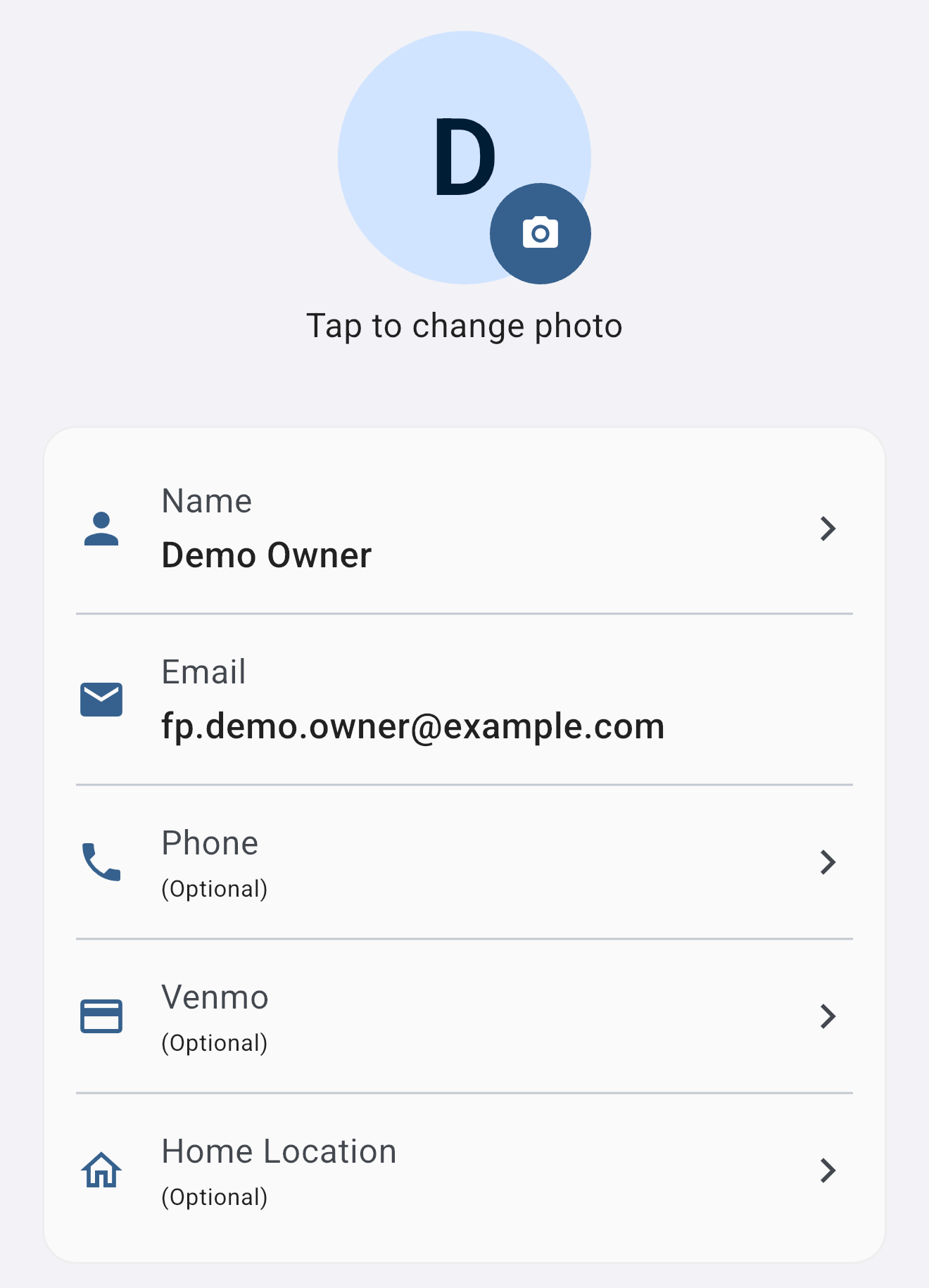
From Settings → Account → Profile you can change:
- Display name (visible on shared projects and trips)
- Profile photo (optional)
- Email address (requires re-verification by clicking a confirmation link)
- Phone number (optional, used only for friend discovery if you opt in)
- Venmo handle (optional, shown to trip companions for settling shared expenses)
- Home location (optional, used as a starting point for trip planning)
Export your data
You can download a complete export of your account at any time.
- Open Settings → Account → Export My Data.
- Confirm the email address to send the export to (defaults to your account email).
- You'll receive a download link, usually within a few minutes.
The export includes:
- A JSON archive of your projects, tasks, notes, reminders, and trips
- Document metadata (filenames, sizes, types, project associations)
- A separate ZIP of your uploaded documents and images at original resolution
Exports are produced on demand — we don't keep old exports stored. Each request generates a fresh archive.
Delete your account
Account deletion is in Settings → Account → Delete Account. The flow asks you to confirm, then to re-authenticate to prove you're the account holder.
What gets deleted:
- Your profile, sign-in credentials, and account email
- Your personal projects, tasks, notes, reminders, trips, and bookmarks
- Documents and images you uploaded
- Your notification settings, integrations (Google Calendar, YouTube), and preferences
What survives deletion:
- Shared projects are preserved as long as at least one other admin remains active. Your name is removed from member lists; the project itself stays.
- Trip expense records that reference you are kept as a historical financial record — necessary so other trip members can settle balances. Your name is preserved on those entries with a "deleted account" indicator.
- Active Premium subscriptions live with Apple or Google, not with us. Cancel separately through the App Store or Google Play before deleting your account, or you may continue to be billed.
Account deletion is permanent. There is no recovery window. If you change your mind later, you'll need to create a new account.
Delete a single project
To delete one project (not your whole account), open it and tap Settings → Delete Project. Only project admins can delete a project — if you're a Member on someone else's project, you can leave the project (which removes your access) but you can't delete it for everyone.
What gets deleted when a project is removed:
- The project itself and its metadata (name, description, color, sharing settings)
- Every task in the project (including completed ones and tasks created by collaborators)
- Every note attached to the project, along with their comments
- Every event, bookmark, and sticky note linked to the project
- Whiteboard pages, boards, and any documents stored in the project's folder tree
- For trips: every day, stop, reservation, expense, and payment within the trip
- Collaborators' contributions inside the project — a Member's task or note dies with the project, since their access was scoped to it
What survives:
- Trip expense settlement records reference a deleted project but remain in each member's personal expense history so balances can still be settled. Your name and the amount stay attached, with a "project deleted" indicator.
- Tasks and notes that were personal (not attached to any project) are untouched.
- Collaborators keep their own personal data and any other shared projects they're a member of.
Project deletion now goes to Trash with a 30-day recovery window. While the project sits in trash, none of its contents appear in active lists, planner, calendar, or search — same behavior as an archived project. Restore from Settings → Trash to bring the project (and everything inside it) back in one step. If you don't restore within 30 days, the nightly cleanup hard-deletes it and the cascade is irreversible. If you just want to hide a project without the 30-day timer, use Archive instead — archived projects stop appearing in your active list but stay restorable indefinitely.
The 24-month inactivity rule
To keep the service efficient and to minimize the personal data we retain, free-tier accounts with no sign-in for 24 consecutive months are deleted automatically. Premium subscribers are exempt while their subscription is active.
Before any account is deleted for inactivity, we send three transactional notification emails:
- 30 days before deletion
- 7 days before deletion
- On the day of deletion
Signing in to your account at any time during the warning window cancels the deletion and resets the 24-month clock to zero. The full policy lives in our Privacy Policy and Terms of Service.
Switch the email on your account
Settings → Account → Profile → tap your email. Enter the new address; we'll send a confirmation link to the new email. The change takes effect once you click that link.
If you signed up with Apple or Google and want to switch to a different sign-in method, contact support@milehighsoftwaresolutions.com — we can help merge your data without losing anything.
Was this helpful? Email support@milehighsoftwaresolutions.com with feedback, corrections, or questions we should add here.